


Campus Student
3.62.44K Reviews
App Specs
- Version
- 1.12.3
- Updated On
- License
- Free
- Downloads
- 1,000,000+
- Developer
- Infinite Campus, Inc.
- Categories
- Education
- Platform
- Android, iOS
Screenshots
 Analysis by AppCompare
I find a student portal most useful when it helps me answer practical questions quickly: What do I need to do next? Has my attendance been recorded? Did a grade or announcement change? Campus Student is built around that everyday check-in, bringing school information onto a phone rather than asking students to track every detail through separate pages or paper notes. It is an education app from Infinite Campus, Inc., and its value depends on whether a student’s school uses the Infinite Campus system.
What the app is for today
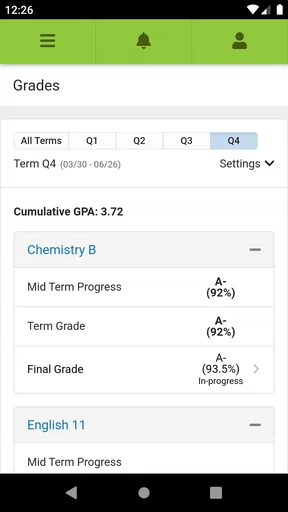
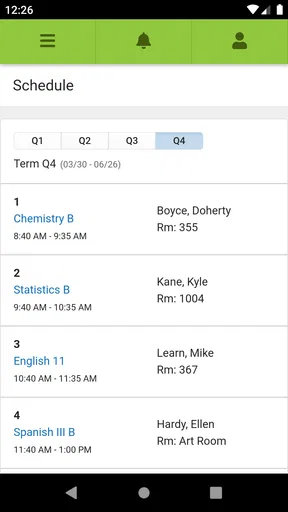
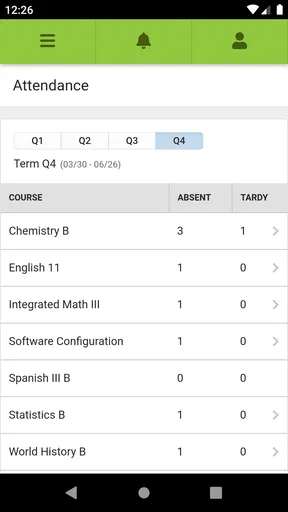
At its best, the app acts as a convenient window into the information a school maintains: announcements, assignments, attendance, grades and schedules. That makes it less of a general study planner and more of a companion to a school’s existing administrative system. I would not expect it to replace a calendar, notes app or learning platform; I would use it to check the school-recorded details that those tools may not contain.
That distinction matters before downloading. A student needs the right school account and access to the service, so this is not an app that becomes useful simply by creating a personal profile. If a school does not use Infinite Campus, or a student cannot sign in through their school, another portal or the school’s own communication channel will be the better choice. When access is available, though, having the school’s key updates on a phone can make quick checks much less cumbersome.
How it fits into a student’s routine
A realistic use is a short morning review: I would check the day’s schedule, look for a new announcement, and confirm whether attendance or grades need attention. Later, before heading home, I could revisit assignments to make sure I have not missed a task. That kind of routine works because each check has a clear purpose; the app is most helpful as a reference point, not as a substitute for doing the work or planning study time.
There is also a useful habit hidden in the way the information is grouped. Rather than relying on a single glance at a grade, I would compare it with the schedule and assignment details around it. If something looks unexpected, checking the related school information first can help distinguish a genuine concern from a timing or recording issue. For questions that need an explanation, the teacher or school remains the right person to contact.
What version history can—and cannot—tell you
The current version is 1.11.5, and the app was released on September 20, 2018. Those facts show that this is an established product with a continuing version history, but a version number alone does not tell me which features changed, how often updates arrive, or whether a particular school has adjusted its setup. I would treat the current release as the version to assess, rather than assuming a recent number guarantees a major redesign or a specific improvement.
For an existing user, the practical question is whether the app still provides a dependable route to the information their school publishes. After an update, I would check that sign-in still works and that the sections I rely on remain easy to find. If the school changes its portal arrangements, the school’s instructions matter more than assumptions based on the app’s version. Product evolution is useful only when it keeps pace with the way a student’s own school uses the system.
Worth Reading Before You Choose

EA SPORTS FC Mobile 26 Is a Bigger Football Game, but It Takes Time

Flipboard Shows What News Apps Must Do Beyond the Feed

Switching to Android Auto Means Rethinking Your Driving Routine

Google Calendar Makes a Crowded Week Easier to Manage

Ludo King Makes the Most of the Minutes Between Plans

Baby Panda World Brings Quick Play to Modern Phones, but Its Game Library Feels Busy
Choosing it over a planner or school website
Compared with a paper planner, Campus Student can be quicker for checking school-held details, especially attendance or a posted grade. A planner is still stronger for personal priorities, study blocks and reminders that a student wants to create independently. Compared with a general calendar, the app’s advantage is its connection to school information; the calendar’s advantage is that it can bring together lessons, work shifts, family commitments and appointments from different parts of life.
I would use the two approaches together rather than force one to do everything. The portal can tell me what the school has recorded, while a calendar or notebook can help me decide when to complete the work. That division also avoids a common trap: seeing an assignment in a school app and assuming that viewing it is the same as planning for it. Students who want a complete task manager, detailed revision system or cross-school organizer may find a dedicated planning tool more suitable.
Who benefits, and where the friction remains
This app is a sensible fit for students who already have an Infinite Campus account and want a quick mobile check on school activity. Parents or guardians may also find a school portal useful when their access is set up by the school, but the student-focused app should not be treated as a replacement for whatever family communication process the school requires. The app is less relevant to students whose institutions use a different system, and it may not suit someone who prefers to keep all planning in one general-purpose organizer.
Its usefulness also depends on the information a school makes available through its system and how consistently that information is maintained. A student should not assume that a phone view is always a complete explanation of a complicated grade or attendance record. If an entry seems wrong, the sensible next step is to confirm it through the school’s normal process, not to rely on repeated refreshes or treat the app as the final authority.
Access is another practical consideration. Since the app is tied to a student account, it is worth knowing how the school expects users to sign in and whom to contact if access stops working. I would avoid sharing account credentials or leaving a school account open on a shared device. Those are ordinary precautions, but they matter when an app brings personal academic information into one place.
The app is free and rated for everyone. It has a 3.6 average from around 6,900 ratings, alongside roughly 2,400 written reviews, and it has been installed over a million times. I see that as evidence of a widely used tool with mixed user experiences, not as a guarantee that every school’s setup will feel equally smooth. A school portal is only as convenient as the connection between the app, the account and the information the institution provides.
A useful check-in, not a complete study system
My recommendation is straightforward: if your school uses Infinite Campus and you have working access, this is worth trying as a fast way to review school information on your phone. If you need a flexible planner for every part of your day, pair it with a calendar or choose a tool designed for that job. If your school uses another platform, downloading this one is unlikely to solve the problem you actually have.
Before making it part of a routine, I would sign in, confirm that the expected school sections are available, and check that the schedule and recent information look right. Then I would use it for brief, purposeful reviews rather than checking constantly. That keeps the app in its strongest role: a convenient link to school-managed information, while leaving personal organization, follow-up questions and study decisions in the student’s hands.
If you’ve ever found yourself drowning in a sea of paper planners and sticky notes while trying to keep your college life together, then Campus Student might just become your new best friend. This nifty app is designed to streamline and organize every aspect of a student’s life, from tracking grades to managing assignments. Let's dive into what makes this app a must-have for students everywhere.
Getting Started with Campus Student
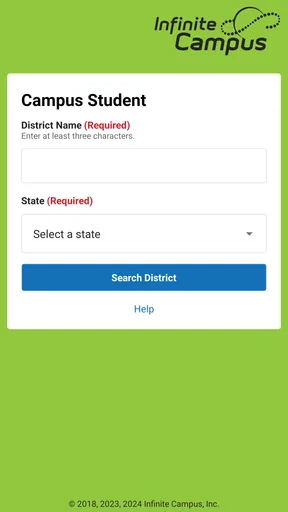
First things first, downloading Campus Student is a breeze. Available on both Android and iOS, it’s just a quick search in your app store away from being on your phone. Once installed, the setup is straightforward. You’ll be prompted to sign in with your student account, which instantly syncs all your academic data.
The app’s interface is sleek and user-friendly. It’s got this modern, minimalistic vibe, which is perfect because nobody wants to navigate a cluttered app when trying to check their grades or assignments. The dashboard is the first thing you see, and it’s like your personal command center. Everything you need is just a tap away.
Organize Your Academic Life
Let’s be real here, staying on top of assignments and exams can be overwhelming. But with Campus Student, you’ve got a digital assistant in your pocket. The app allows you to view your schedule, add assignments, and even set reminders. It’s like having a personal assistant that never sleeps.
One feature I absolutely love is the grade tracker. You can keep tabs on your performance in real-time. No more surprises at the end of the semester! It’s incredibly satisfying to see your progress laid out in charts, helping you identify areas that might need a little extra attention.
Stay Connected
Communication is key in college, and Campus Student makes it super easy. The app provides direct access to contact teachers and classmates. Need to shoot a quick email or check an announcement? It’s all integrated within the app, so you don’t have to hop between different platforms.
Plus, there’s a nifty feature for campus news and events. You’ll never miss out on important announcements or fun events happening around campus. It’s like having the campus bulletin board in your pocket.
Privacy and Security
Now, I know what you’re thinking—what about privacy? Well, the developers have thought this through. The app uses secure login protocols to ensure your data remains private and protected. So, you can manage your academic life without any worries about security breaches.
Final Thoughts
In a nutshell, Campus Student is like having a personal, digital assistant specifically designed to tackle the chaos of college life. With its intuitive interface and comprehensive features, it’s a game-changer for students aiming to stay on top of their academic responsibilities. Whether you’re just starting college or are in the thick of your final year, this app is an invaluable tool to help you succeed.
So go ahead, give it a try! You might find that it’s the missing piece in your quest for academic success. And honestly, who couldn’t use a little help staying organized these days?
Pros
- User-friendly interface for easy navigation.
- Real-time updates on grades and assignments.
- Push notifications for important alerts.
- Secure login with multi-factor authentication.
- Customizable dashboard for personalized experience.
Cons
- Limited offline functionality.
- Occasional sync issues with server.
- Requires frequent app updates.
- Not all features available on mobile.
- Some features hidden behind paywall.
FAQs for Campus Student
What is Campus Student and what can it do?
Campus Student is an educational app designed to help students manage their academic life. It provides features such as grade tracking, assignment deadlines, and class schedule management. With a user-friendly interface, it helps students stay organized and up-to-date with their coursework, enabling better time management and productivity.
Is Campus Student free to use, or does it require a subscription?
Campus Student offers a free version with basic features accessible to all users. However, there is also a premium subscription available, which includes advanced features like personalized tutoring, ad-free experience, and enhanced data analytics. Users can choose the version that best fits their needs.
How secure is the data on Campus Student?
Campus Student prioritizes user privacy and data security. It employs encryption protocols to protect sensitive information such as grades and personal details. The app complies with educational privacy standards to ensure that users' data is handled with the utmost care and confidentiality.
Can Campus Student be integrated with school systems?
Yes, Campus Student can be integrated with several school management systems. This allows seamless synchronization of data such as grades and attendance records. Schools and institutions can collaborate with the app developers to set up integration, providing a streamlined experience for students and teachers.
What devices are compatible with Campus Student?
Campus Student is available for both Android and iOS devices, ensuring a wide range of compatibility. The app is optimized for smartphones and tablets, providing a responsive and intuitive user experience. Regular updates ensure that it remains compatible with the latest versions of both operating systems.


